
From spreadsheets to strategy.
The CDE Pipeline Builder is a centralized allocation planning system for CDEs — built to manage your full NMTC pipeline, track allocation in real time, and align every deal with your strategic priorities.
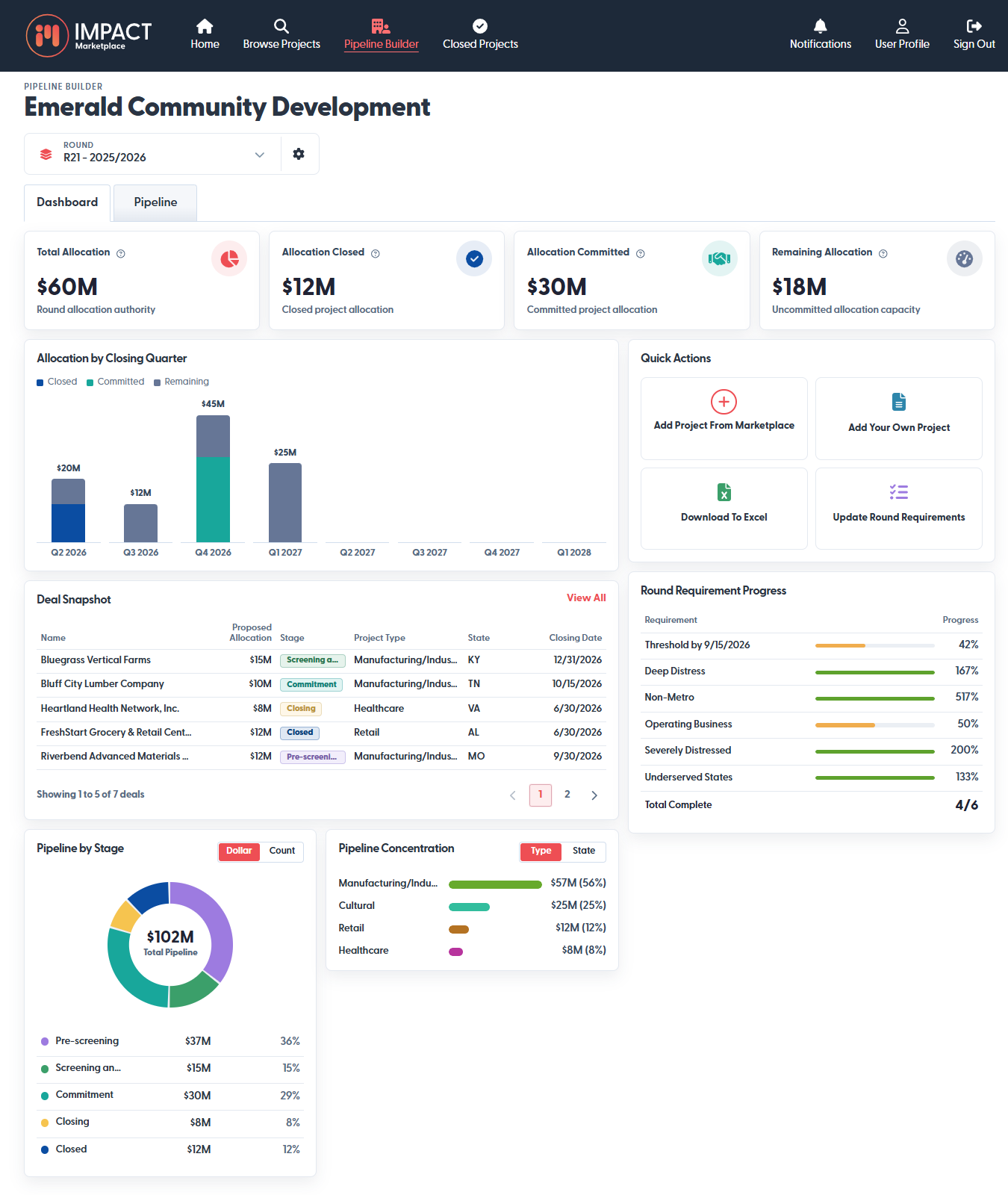
Built by NMTC practitioners — for CDEs.
NMTC experience
CDE workflows
source of truth
Pipeline management shouldn’t live in twelve spreadsheets.
Most CDEs are still managing pipeline strategy across spreadsheets, emails, static reports, and disconnected systems. As allocation rounds get more competitive, that fragmented approach makes it harder to understand pipeline strength, prioritize deals, and confidently plan against your allocation targets.
“One challenge surfaced repeatedly: pipeline management remains highly fragmented and manual. Teams are forced to manage deals across spreadsheets, internal docs, emails, and disconnected systems.”
Allocation planning lives in one spreadsheet. Deal sourcing lives in another. The compliance team rebuilds both from scratch at close.
It’s hard to see how the pipeline is tracking against deep distress, non-metro, and other strategic targets without manually re-running the math.
When deals shift — sizes change, target close moves, projects drop — downstream reports don’t update with them.
Every deal, every round — in one structured view.
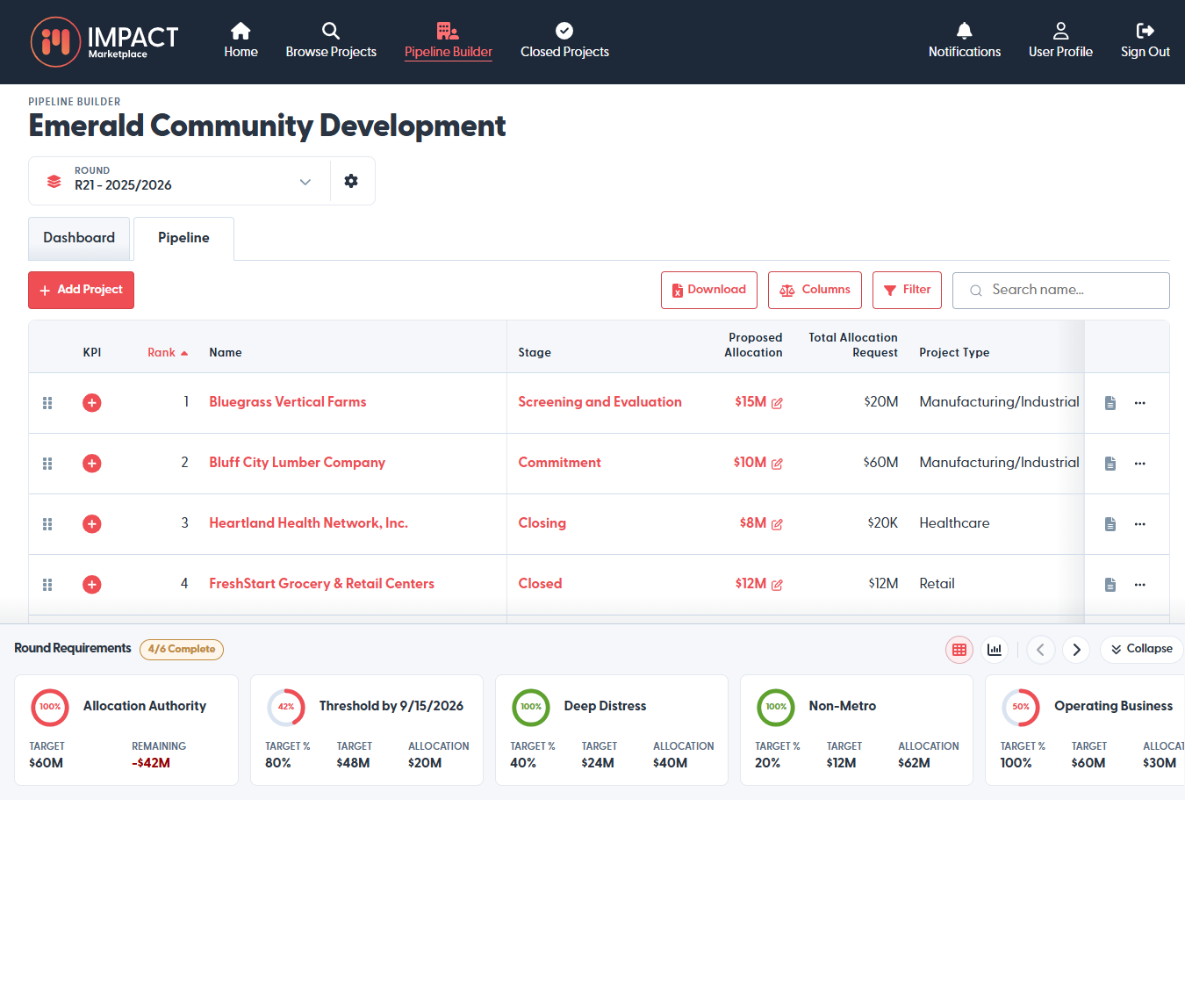
View and manage all prospective and active projects in a sortable, rankable pipeline. Marketplace deals, internally-sourced opportunities, partner referrals, and future round pipeline — all in one place.
- Allocation amounts, stage, timeline, geography, sector, jobs, distress metrics
- Rank deals by strategic importance and rebalance as the round evolves
- Round Requirements panel surfaces shortfalls before they become problems
A strategic planning layer — not just a tracker.
Pipeline Builder gives CDEs a single, structured place to organize pipeline, track allocation in real time, and align deals with their broader strategy.
Centralized pipeline management
One structured, sortable view of all prospective and active projects — allocation amount, stage, geography, sector, jobs created, distress metrics, target close date.
Real-time allocation visibility
Track proposed vs. committed allocation as deals evolve. Adjust dynamically. Understand coverage in real time. Identify gaps before they become round-day problems.
Allocation target alignment
See how your pipeline tracks against proposed targets across Rural, Deep Distress, Non-Metro, Manufacturing/Industrial, Underserved States. Visual indicators update automatically.
Prioritization & strategy
Rank projects by strategic importance, prioritize high-impact opportunities, rebalance allocation assumptions, and build a clearer narrative around pipeline deployment.
Real-time pipeline insights
Total pipeline allocation, remaining capacity, coverage ratios, distribution across strategic categories, and each project’s contribution to your goals — continuously updated.
Flexible workflow integration
Add projects directly from Impact Marketplace, upload external opportunities, move deals through stages, collaborate across internal teams, and export pipeline reports.
Not just Marketplace deals.
Pipeline Builder is built to manage your entire CDE pipeline — wherever the deal came from. That’s what makes it a strategic planning system instead of just another deal tracker.
NMTC depth, in a product.
Impact Marketplace is built by people who’ve structured NMTC transactions and written CDE allocation applications — not by a generalist software team learning the program on the fly.
Pipeline Builder was designed directly from feedback and conversations with CDEs across the country. It reflects how NMTC deals are actually sourced, organized, and strategically managed.
What CDEs ask before they start.
Who is Pipeline Builder for?
CDEs — specifically the originators, underwriters, and allocation managers responsible for sourcing, prioritizing, and strategically deploying NMTC allocation. If your team currently runs pipeline strategy across multiple spreadsheets, shared drives, and email threads, Pipeline Builder is the upgrade.
How is this different from a generic CRM or project tracker?
Generic tools don’t understand NMTCs. Pipeline Builder is built from the CDE workflow down — allocation roll-up, round requirement tracking, strategic category alignment, and stage management all reflect how CDEs actually plan and deploy allocation.
Can it manage deals from outside the Impact Marketplace?
Yes — that’s the point. Pipeline Builder manages your full pipeline: deals sourced through Impact Marketplace, internally sourced opportunities, partner referrals, and future round pipeline. All in one place.
How does it handle multiple allocation rounds?
You can switch between rounds at the top of the workspace and manage each round’s pipeline, allocation, and requirement progress independently. Future round pipeline can be staged before the round opens.
Does it track progress against my application commitments?
Yes. The Round Requirement Progress panel tracks progress against the strategic categories that matter for your application — Deep Distress, Non-Metro, Operating Business, Severely Distressed, Underserved States, and more — with visual indicators that update as deals move through your pipeline.
How does onboarding work?
We’re currently onboarding CDEs into the beta and gathering feedback from teams preparing for upcoming allocation rounds. You can sign up free to get started, or schedule a demo to walk through the platform with our team first.
Stop reacting to spreadsheets. Start planning the round.
Pipeline Builder is in beta and onboarding CDEs now. Sign up free, or schedule a demo to see it in action with our team.